
Welcome to TranFu.
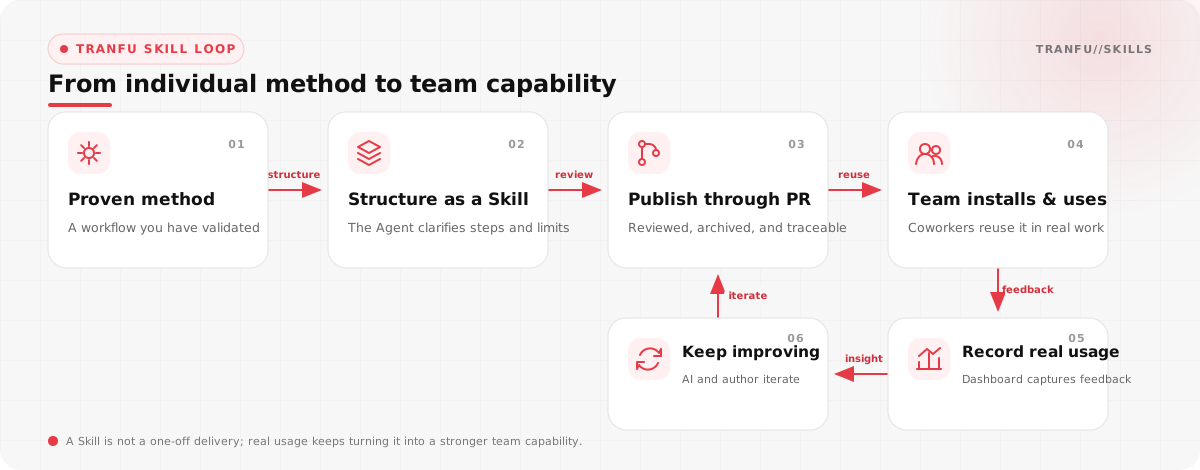
On your first day, you may hear a cluster of unfamiliar terms all at once: Skill, tfs, GitHub, TRANFU//AGENTS, the Agent Steward bot, and the usage dashboard. You do not need to memorize them yet. Together, they solve one problem: turning a working method that one person has validated into a capability the whole team can reuse.
For now, think of the system as three things:
- tranfu-labs/tranfu-skills is the team's shared library of working methods.
tfsis the manager that helps you search, install, update, and publish Skills.- TRANFU//AGENTS is the feedback layer that records which Skills are actually used and helps the team choose what to improve next.
This guide will take you through the complete journey. You do not need to learn Git commands first, and you do not need to study the SKILL.md format on your own. Once you have completed your first installation, first recorded call, and first publication, the whole system will make sense.
Complete Your First Setup
This section covers your onboarding steps. Under normal conditions, you can finish them in less than half an hour.
- Step 1: Let the System Know Who You Are
If you do not have a GitHub account yet, create one and send your GitHub username to the technical director. An administrator will invite you to the
tranfu-labsorganization.Next, send your Lark Public ID and GitHub User ID to the administrator. The administrator will connect the two identities in the Agent Steward bot and add you to the "Tranfu Skill Operations" Lark group.
You may be wondering:
Why do these two identities need to be connected?
Skill code and pull requests live on GitHub, while reminders and discussions happen in Lark. Once the identities are connected, the bot can mention the correct person when your Skill is published, a review needs your decision, or another person wants to change your Skill.
- Step 2: Ask an Agent to Install the Company Skill Library
Make sure the computer has Node.js 20+.
Open any Agent you currently use and send it this complete instruction:
Read https://github.com/tranfu-labs/tranfu-skills/blob/main/INSTALL.md
and install the company Skill library by following the documented steps.
The Agent will install
tranfu-skills, initializetfs, and run an environment check. When it finishes, two common entry points will be available:tranfu-routerhandles search, installation, listing, updates, removal, and diagnostics.tranfu-publishhandles publishing your own Skills, recommending external Skills, and adding usage cases.
You do not need to invoke their technical commands directly. From this point on, describe what you want in natural language and let the Agent choose the appropriate entry point.
Walk the basic flow and install tranfu-skills - Step 3: Let Every Agent Record Skill Usage
Send this instruction in the current Agent:
Follow the instructions at
https://raw.githubusercontent.com/tranfu-labs/tranfu-agents-app/refs/heads/main/INSTALL.md
and connect this Agent to TRANFU//AGENTS.

My name: <your name>
This Agent's purpose: <for example, coding, research, or document writing>
Dashboard URL: https://tranfu-agents-app.tranfu.com
Access key: ask me to obtain it from an administrator; do not use an example key from public documentation.
The installer will identify whether the current runtime is Codex, Claude Code, or another supported Agent. Never put the access key in public documentation, a repository, or a screenshot. Obtain it directly from an administrator.
By default, telemetry includes only the operator, Agent purpose, runtime status, active time, and the Skill name being used. It does not include prompts, code, parameters, or outputs. Do not enable content capture yourself. If the work genuinely requires it, first confirm that everyone with dashboard access is allowed to see that content.
- Step 4: Complete Your First Skill Call
Now run a harmless test with no file changes:
Install the prompt-review Skill from the company library and invoke it once in this session.
This is only a Skill telemetry test; do not modify any files.
Then open the Skill usage dashboard, or go directly to the prompt-review usage record.
When your name appears in the latest records, your first setup is complete. You now have everything required for everyday use of company Skills.
In Everyday Work, Just Say What You Need
From your second day onward, you will rarely touch installation commands. Tell the Agent what you need.
You: Find company Skills related to market research.
Agent: I will find the best-matching candidates in the company library and explain when each one is useful.
After finding the right one, continue with:
Install prompt-review at user scope.To see what is already installed:
List the company Skills installed on this computer.To get the latest versions:
Update the TranFu library.To remove a Skill that came from the company library:
Uninstall the company Skill prompt-review.User scope is the default choice for most employees because it makes the Skill available to different projects within the same Agent runtime.
You may occasionally see three directories in the repository. meta-skills contains tools that manage the system, own-skills contains capabilities created by company members, and external-skills contains external capabilities recommended by the team. As a regular user, you do not need to operate by directory. It is enough to understand that the sources differ.
When You Explain the Same Task for the Tenth Time, Consider a Skill
One afternoon, you may find yourself explaining the same rules again: which sections a report must contain, when the Agent must not draw a conclusion, or where a file should be placed. That moment is often the beginning of a new Skill.
Do not start by writing a file. Ask yourself four questions:
Does this task repeat often and consume meaningful time each time?
Is the workflow relatively stable rather than completely different every time?
Does it contain company rules, judgment criteria, or delivery formats that an Agent cannot guess?
Can I explain when it should be used and what observable result counts as done?
If most answers are yes, the idea deserves further work. Generic translation, light copyediting, one-off temporary tasks, and experience fragments that contain a conclusion but no process usually do not need to become Skills.
When you are unsure, give the raw material to skill-content-fit:
Use skill-content-fit to decide whether the material below should become a Skill,
and identify what information is still missing:

<paste your experience, rules, workflow, or retrospective>
It will not say yes merely to increase the catalog size. It checks whether the work is repeatable, has a clear trigger, can be executed and verified, and includes enough boundaries and counterexamples.
For the complete decision method, see What content is suitable for a Skill.
Do Not Write Your First Skill Alone
Once the idea passes the fit check, give it to the company's standard entry point, skill-create-workflow:
Use skill-create-workflow to turn the working method below into a company Skill:

<paste the rules, workflow, examples, or provide a local file path>
The Agent should not immediately hand you a file that merely looks complete. It will first discuss how real users describe the task, which neighboring requests should not trigger it, what the input and output are, what happens when files or permissions are missing, and what result counts as complete.
These questions are not unnecessary delay. The most valuable part of a Skill is making the judgments that feel obvious to you explicit, so the next coworker and the next Agent conversation can reuse them.
Behind the scenes, the standard workflow does the following:
skill-content-fitchecks whether the material meets the admission criteria.skill-domain-framingchooses an appropriate task domain, name, and boundary.- The Agent interviews you to complete the workflow, failure paths, examples, counterexamples, and acceptance criteria.
skill-creatorcreates files that match the platform format.prompt-reviewchecks triggers, boundaries, instruction strength, and process completeness.tranfu-publishsubmits the result to the company library and creates a pull request.
You do not need to request approval for every individual step. In the standard workflow, prompt-review runs automatically. Running one real example before publication is recommended, and additional cases can be added when a frequently used Skill is improved later. The system comes back to you only when an answer depends on the author's real intent.
To understand the authoring process first, read How to write a Skill.
What Happens After You Submit a Pull Request
At the end of the creation workflow, you receive a pull request on GitHub. This is the only formal path for a Skill to enter the company library. The protected main branch is not edited directly.
Automation checks the format, adds or normalizes readable English and Chinese names and README files, runs repository validation, and generates the catalog. After the change is merged and published, the Agent Steward bot sends a "Skill is live" card in Lark and mentions the author. The card links directly to the published Skill.
Automatic Icon generation has not been implemented yet, so a missing Icon is not currently a publication failure.
AI handles most mechanical formatting work, but the following cases require a person:
- The format is unusual and automation cannot determine a safe correction.
- The pull request unexpectedly deletes an existing file or Skill.
- The person changing an existing Skill is not its original author.
prompt-reviewfinds athinkissue that only the author can decide.
You may see the terms direct and think in the operations group. direct means there is a standard answer, such as aligning field names or correcting a format, so it can be handled automatically. think means the answer depends on real business intent, such as how users actually refer to the Skill or which of two conflicting rules takes priority. AI must not invent those answers; it sends the questions to the "Tranfu Skill Operations" group.
The current phase focuses on getting more real working methods into the company library and improving them based on usage. Regular releases and 1.0.0+ releases therefore do not have different human-approval rules, but every change must retain a traceable pull request.
After publication, the original author maintains the Skill. When another coworker finds a problem, they contact the author in the operations group first. A pull request that changes an existing Skill but was submitted by someone other than the author must not pass automatically.
For the full process, read How to publish your first Skill.
You Can Bring Back a Useful External Skill Too
You do not need to repackage or copy another author's full content. Give the upstream URL to tranfu-publish:
Recommend this external Skill to the company library:
<external Skill or repository URL>
The Agent validates the link, determines whether the upstream source contains one Skill or several, creates a thin pointer to source_url for each Skill, drafts the recommendation scenarios, comparisons, usage tips, and known limitations, and finally submits everything through a pull request.
The company library does not copy and take ownership of the complete external Skill body. During installation, tfs still retrieves the content from upstream. Being recommended therefore does not mean the company guarantees upstream security, licensing, or continued availability. Before recommending one, confirm that the source is trustworthy, the license permits the intended use, the Skill does not read or upload unnecessary data, and future upstream changes may need another review.
Publication Is Not the Finish Line; Real Usage Is
The TRANFU//AGENTS Skill dashboard is public. It shows which Skills are called, their call counts and trends, who uses Skills most often, and which Agents are currently active.
Every day at 20
, the company group receives a Skill usage report. It is not an employee ranking. It helps answer practical questions: Which Skills have entered everyday work? Which ones are growing? Which frequently used capabilities deserve improvement first?When a Skill gains significant usage, or during a scheduled library review, the system runs quality checks again. AI can handle mechanical direct issues. Business-dependent think issues go to the original author in the operations group. The author decides whether to accept them based on real usage, and improvement suggestions are not currently mandatory remediation work.
On a Workday Morning, Updates Should Happen Quietly
In the target experience, every connected Mac checks TranFu Core and all installed company Skills at 9
on workdays. Regular and major versions update automatically. A Skill removed upstream is not silently deleted from the computer, and a locally modified Skill is not overwritten.After the update, macOS sends a native system notification such as:
TRANFU//SKILLS update complete

Core: 0.6.0 -> 0.7.0
Updated 3 Skills:
- prompt-review: 0.9.0 -> 0.9.1
- skill-content-fit: 0.3.0 -> 0.4.0
- market-analysis: 1.2.0 -> 2.0.0
If a Skill fails to update because of a local change or another issue, the notification identifies the Skill and the reason:
TRANFU//SKILLS update partially failed

Core: 0.6.0 -> 0.7.0
Succeeded: 2 Skills
Failed: 1 Skill
- prompt-review: local changes detected; files were not overwritten
When you receive a failure notification, you do not need to debug the underlying script yourself. Contact an administrator in the "Tranfu Skill Operations" group.
This workday auto-update flow is still a target capability, and the administrator implementation tasks are at the end of this article. Until it is complete, or whenever you need the latest version immediately, say this in any Agent:
Update the TranFu library.The current manual update may download a fresh copy and replace a Skill directory managed by tfs. If you have changed a local Skill, preserve the changes or contact an administrator first. Do not assume that local-change protection is already available.
Questions You May Still Have
Can I Edit a Locally Installed Skill?
Yes. Local editing is fine for testing an idea, but the change does not automatically become the team's standard version. Once it proves useful, contact the original author in the operations group and publish the official change through a company-library pull request.
The Dashboard Is Public. Will It Upload My Work?
By default, it does not upload prompts, code, parameters, or outputs. It records the operator, Agent purpose, runtime status, active time, and Skill name. However, which Skill was called, how often it was called, and who used it are publicly visible. Do not enable content capture yourself.
What Is the Easiest Mistake to Make in a Public Repository?
Accidentally submitting internal information as part of an example. A Skill, README, case file, test fixture, or screenshot must not contain credentials, customer information, unnecessary personal data, private service addresses, unpublished product or business plans, or prompts, code, logs, and Agent outputs that have not been approved for publication.
Automated sensitive-information review is not complete yet, so passing CI does not prove that content is safe to publish. The author must still inspect it before submitting.
Who Should I Contact When Installation, Telemetry, Publishing, or Updates Fail?
Contact an administrator in the "Tranfu Skill Operations" group. Include the error text, pull-request link, or failure reason from the macOS notification, but never paste an access key into the group.
You Now Know Enough to Get Started
You do not need to memorize the whole article. Confirm that you have completed these essentials:
- Your GitHub account has joined
tranfu-labs, and your Lark and GitHub identities are connected. - You have joined the "Tranfu Skill Operations" group.
- You installed
tranfu-skills, and every Agent you use is connected to TRANFU//AGENTS. - You invoked
prompt-reviewonce and found the record on the public dashboard. - You can search, install, and update company Skills in natural language.
- You know when work deserves a Skill and how to hand it to
skill-create-workflow. - You know that original Skills and external recommendations both enter the library through pull requests.
- You know that the original author maintains a Skill and that public repositories must not contain credentials or unauthorized information.
The best next step is not to reread this article. Find one task you repeated today and ask skill-content-fit: Should this become a capability the team can reuse?
References:
- Company Skill repository
- Company Skill library installation guide
- Skill onboarding part 1: install tranfu-skills
- Skill onboarding part 2: decide what belongs in a Skill
- Skill onboarding part 3: write a Skill
- Skill onboarding part 4: publish your first Skill
- TRANFU//AGENTS installation guide
- Public Skill usage dashboard
Administrator TODO
The following work is not part of employee onboarding. These are target capabilities confirmed during the interview but not fully implemented. An administrator can copy any block directly into an Agent working in the relevant repository.
TODO 1: Implement Workday 9 Auto-Updates and macOS Notifications
Design and implement a macOS auto-update installation flow in tranfu-skills-cli.

Goals:
- During TranFu Skill installation or initialization, register a per-user scheduled task that runs at 9:00 on workdays.
- In the background, check and update TranFu Core and every installed Skill managed by tfs.
- Update both regular and major versions automatically.
- Report Skills deleted upstream, but do not delete their local directories.
- After updating, send a native macOS notification through osascript display notification.

A successful notification must include:
- The old and new Core versions.
- The number of successfully updated Skills.
- Each Skill's name and old and new semver; do not display internal SHAs.

A failed or partially failed notification must include:
- Success and failure counts.
- The name of each failed Skill and a specific, understandable reason.
- Do not ask the user to open a new Agent session.

Constraints:
- Scheduled-task installation must be idempotent and must not create duplicates.
- Do not rely on an interactive shell PATH; reliably locate node, npm, and tfs.
- Do not use sudo.
- Provide commands to install, inspect, run manually, and remove the scheduled task.
- Add automated tests for version comparison, notification content, partial failures, and upstream deletions.
- Update README, INSTALL.md, and CHANGELOG.
TODO 2: Protect Local Changes from Automatic Overwrites
Add local-change protection to the update flow in tranfu-skills-cli.

Requirements:
- Record enough content metadata during installation to detect later local changes.
- Before updating, compare the current directory with its installation-time metadata.
- When local changes exist, skip that Skill; do not delete, overwrite, or merge it automatically.
- Return a stable machine-readable local-modified status.
- Include the Skill name, installed version, remote version, and the reason "local changes detected; files were not overwritten."
- Show this failure reason in the macOS auto-update notification.
- Provide a safe, explicit path for a user to discard local changes and reinstall, but never run it automatically in the background.
- Cover added, deleted, modified, and unreadable files in tests.
TODO 3: Route Pull Requests from Non-Authors to Human Review
Add author-identity validation to the pull-request review flow in tranfu-labs/tranfu-skills.

Rules:
- When a new original Skill is added, record and validate the frontmatter author against the submitter's identity.
- When an existing own-skill is changed by someone other than its original author, block automatic approval and merging.
- Notify the original author and an administrator in the "Tranfu Skill Operations" group, including the PR link, submitter, affected Skill, and change summary.
- Continue only after the original author or an administrator explicitly approves.
- Bot and administrator maintenance submissions need a clear, auditable allowlist mechanism.
- If identity cannot be resolved, default to human review; never allow by default.
- Add tests for author changes, non-author changes, multi-author Skills, bot maintenance, and missing identities.
TODO 4: Add Sensitive-Information Review for the Public Repository
Add public-content security checks to pull-request CI in tranfu-labs/tranfu-skills.

At minimum, check for:
- API keys, tokens, passwords, cookies, private keys, and certificates.
- Lark, GitHub, cloud-service, and common SaaS credential formats.
- Private IP addresses, private domains, and internal service endpoints.
- Unnecessary phone numbers, email addresses, identity numbers, and other personal information.
- High-risk files that may contain customer information, unredacted logs, or internal business information.

Handling rules:
- High-confidence credentials and private keys must block merging.
- Low-confidence personal or business information must go to human confirmation.
- Reports show only the file and location and must never echo a complete secret in logs.
- Support justified, auditable false-positive exemptions.
- Scan SKILL.md, README files, cases, scripts, test fixtures, image metadata, and all other submitted files.
- Add the public-repository security requirements to README and contribution documentation.
TODO 5: Generate and Add Skill Icons Automatically
Implement automatic Icon completion for new Skills in tranfu-labs/tranfu-skills.

Requirements:
- Define the Icon file format, dimensions, transparent-background rules, naming convention, and directory convention.
- When a new Skill pull request has no Icon, let automation generate a candidate asset and commit it to the pull-request branch.
- Do not overwrite an author-provided Icon that already meets the standard.
- Generation failures must not be silent; explain the reason in the pull request and the "Tranfu Skill Operations" group.
- Assets must not contain trademark-infringing elements, personal information, or unauthorized material.
- Establish one stable Icon path convention shared by the catalog, website, and installation package.
- Add format, dimensions, file-size, and regression tests.
TODO 6: Align the Company Repository README with Current Review Rules
Update README and related publication documentation in tranfu-labs/tranfu-skills so they match the current company rules.

Required changes:
- Remove the old rule that publishing version 1.0.0 or later requires human approval.
- Explain that the current phase uses automatic format review with traceable pull requests.
- Explain that unusual formats, unexpected deletion, non-author changes, and think-type author decisions require human review.
- Explain that automation adds readable English and Chinese names and README files.
- Mark automatic Icon completion as planned, not implemented.
- Explain that the original author maintains a Skill and other contributors contact the author in the "Tranfu Skill Operations" group first.
- Explain that tfs already supports manual one-command updates, while workday 9:00 background updates remain a target until implemented.
- Check README, INSTALL, CHANGELOG, and other contribution documentation for conflicting statements and keep them consistent.